How to Outrank Your Restaurant Competition on Google Maps
When someone nearby searches for a place to eat, Google shows three restaurants on a little map, and most people pick one of those three. This is a plain-English, step-by-step guide to climbing that map, getting ahead of the spot down the street, and turning your free Google Business Profile into more guests walking through your door. No jargon, no paying Google, just the handful of things you actually control.

- The restaurant that wins the little Google map is rarely the best one. It is usually just the one that set up its Google presence properly and kept it active. That means those spots are up for grabs.
- The map at the top of Google is called the local 3-pack. Most hungry people pick one of the three and never scroll. Getting in is free and runs almost entirely on your Google Business Profile.
- Your Google Business Profile (it used to be called Google My Business) is the free box about your restaurant on Google. Claim it, verify it, and fill in every field. Empty profiles stay invisible.
- Pick the most specific category you can. "Cuban Restaurant" beats "Restaurant." Most competitors leave this vague, so it is an easy place to get ahead.
- Reviews are the biggest lever you control. The number of reviews, your rating, and replying to every one of them all push you up the map past quieter competitors.
- This is a habit, not a one-time setup. Fifteen minutes a week of posting, photos, and review replies keeps you climbing while the place down the street goes stale.
You know the feeling. You pour everything into your food, your team, and your rent, and somehow the half-empty place two blocks away is the one that keeps showing up first when people search "best tacos near me." It is not because their food is better. It is because they show up on Google's map and you do not.
Here is the good news. That map spot is not bought, it is earned, and most of your competitors are barely trying for it. This guide walks you through exactly how to climb past them, one click at a time, in plain English. Any time a marketing word shows up, I will stop and tell you what it means. By the end you will know what to claim, what to click, and what to do for fifteen minutes a week to stay ahead.
Why the place down the street keeps beating you
Picture a hungry person standing on a corner near your restaurant at 7pm. They pull out their phone and type "dinner near me." In about two seconds, Google shows them a small map with three restaurants on it. They glance at the photos and the star ratings, tap one, and start walking. They almost never scroll past those three.
If your restaurant is not one of them, you did not lose because your food fell short. You lost because you were invisible at the exact moment someone wanted to eat. That is the quiet way restaurants bleed business. Not one bad night, just a steady trickle of guests who never knew you were an option and ended up somewhere else.
Now the encouraging part. The restaurants winning that moment are not always the best ones. Usually they are just the ones who set up their Google presence properly and kept it active. Your competitors are not doing anything you cannot do. That means those three spots are genuinely up for grabs, and the rest of this guide is how you grab one.
What "SEO" actually means for a restaurant
You have probably heard the term SEO thrown around. It stands for search engine optimization, which is just a long way of saying "setting things up so you show up when people search." For a big online store, SEO is mostly about their website. For a restaurant, it is something more specific and honestly more useful: local SEO, which means getting your restaurant to show up when nearby people search for somewhere to eat.
Here is the part that surprises most owners. For a restaurant, the thing that shows up in those searches is usually not your website. It is your Google Business Profile, the free listing Google keeps about your restaurant. A nice website still matters, but the real fight for walk-in customers happens on Google Maps and that little map of three results. So when this guide talks about "ranking" or "showing up," it almost always means showing up on the map, ahead of your competitors, for the people closest to you.
That is the whole idea. You are not trying to beat every restaurant in the city. You are trying to be one of the three Google trusts enough to show the hungry person on the corner. Let us look at exactly what that map is.
The local 3-pack, explained
That little map with three restaurants under it has a name. Marketers call it the local 3-pack (you might also hear "map pack" or "local pack"). It is the block of three businesses Google shows near the top of the page for a local search, each with a star rating, a line or two, and a button to call or get directions.
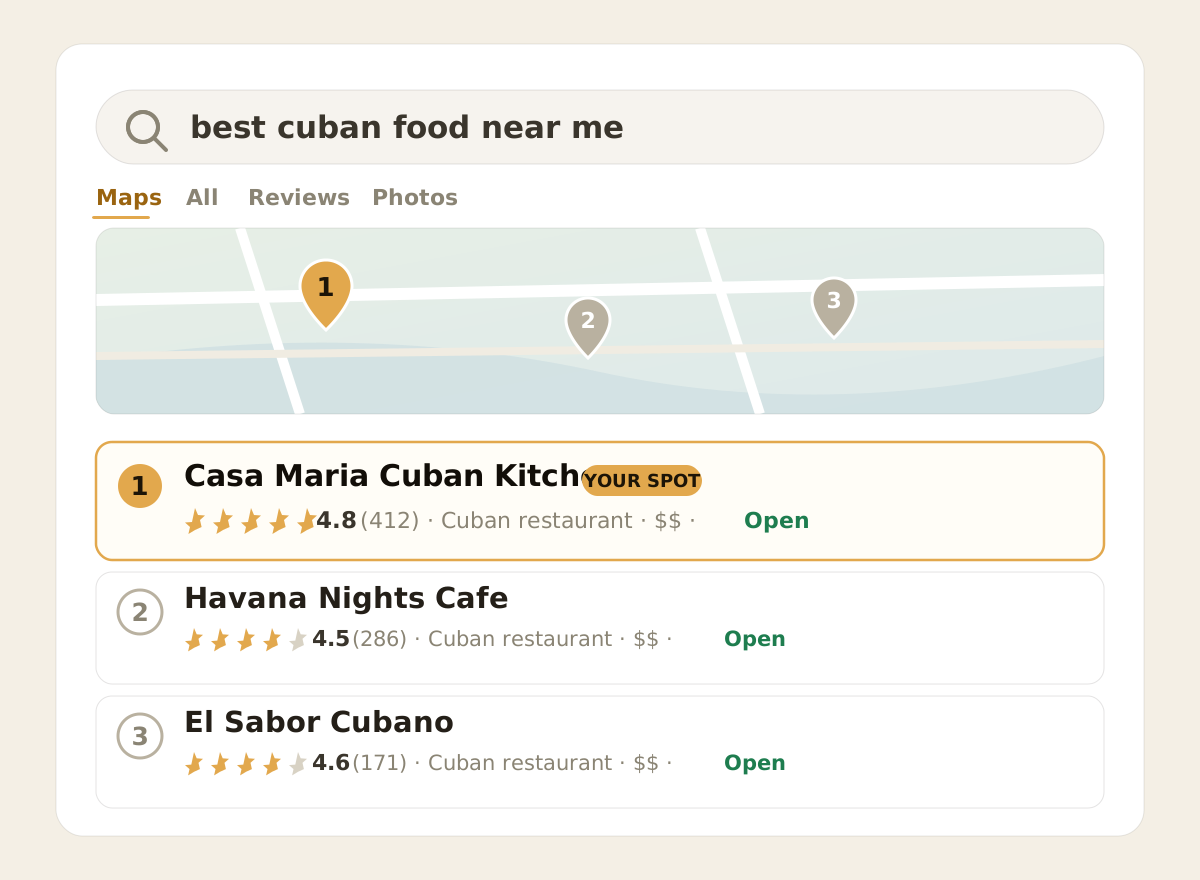
Why does this matter more than almost anything else? Because of where it sits and who is looking. The person searching "ramen near me" is hungry and ready to go right now. They are not researching, they are choosing. The vast majority tap one of the three on the map and never look at the regular blue links below. Your competitors may not know the name for it, but the ones beating you are sitting in those three slots. Getting in is the whole game, and the best part is it does not cost a cent. It runs on a free tool you almost certainly already half-own.
Your Google Business Profile: the free box that controls it all
The single most important thing for the map is your Google Business Profile. In plain terms, it is the box of information Google shows about your restaurant: your name, hours, phone number, photos, reviews, and the little "Directions" and "Call" buttons. You have seen it appear on the right side of the screen on a computer, or as a card you tap on your phone. It used to be called Google My Business, so if you hear that older name from a vendor or a blog, it is the exact same thing.
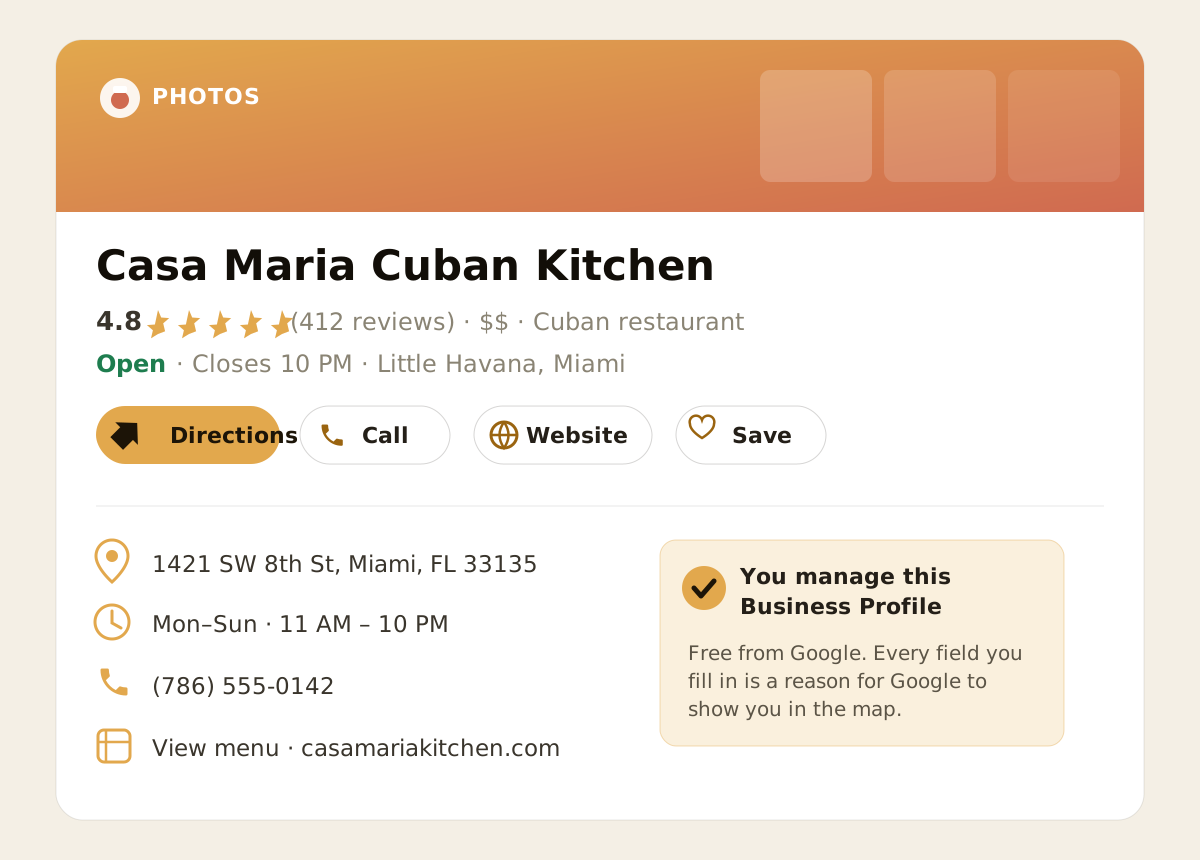
Google builds the 3-pack almost entirely from these profiles. So the whole job comes down to three moves: claim yours, prove you own it, and fill it in more completely than the restaurant down the street. Most restaurants are in one of three situations:
- The profile exists and you control it. Great, you will just be sharpening it.
- The profile exists but you have never logged in. Google often creates a basic listing on its own once a place has been open a while, or a former manager set it up. You need to "claim" it.
- There is no profile at all. You will create one from scratch.
The next sections show you exactly how to tell which one you are, and what to click in each case.
Step 1: Claim and verify your profile (click-by-click)
This is the foundation, and it is where a lot of competitors quietly drop the ball. Until your profile is verified, you cannot fully edit it and you will not rank. Do this part on your phone, because Google now usually asks for a verification video that has to be filmed on a phone anyway.
Find out if you already have a profile
- On your phone, open the Google app or any web browser and go to google.com.
- Make sure you are signed in to the Google account you want to use for the business. Tap the round profile picture in the top right corner to check. If you have a dedicated restaurant Gmail address (something like yourrestaurant@gmail.com), use that one, not your personal account. If you do not have one, create a free Gmail for the business first so ownership is not tied to a staff member's personal email.
- In the search bar, type your exact restaurant name and city, for example "Casa Maria Cuban Kitchen Miami," and search.
- Look at the business box that appears. If you see a link that says "Own this business?" or "Claim this business," the listing exists but nobody owns it yet. Tap that. If you see buttons like "Edit profile," someone already controls it (possibly you).
If you need to claim or create it
- Go to google.com/business in your browser and tap "Manage now."
- Type your restaurant name. If Google shows your restaurant in the dropdown, tap it to claim the existing listing. If nothing matches, tap the option to add your business to Google and create it fresh.
- Follow the prompts to enter your category, address, phone, and website. Take your time and be exact. The address must match your sign and your other listings letter for letter.
Verify that you really own the place
- When you reach the verification step, Google will offer a method. For most restaurants in 2026 this is video verification. Tap "Get verified," then choose "Video verification" if asked.
- You will record one continuous video, at least 30 seconds long, with no cuts or edits, on the phone signed in to your business account. The recorder opens right inside the verification screen of your Google Business Profile, so you do not need to hunt for it.
- The video needs to show three things: proof the place exists (your sign, street number, the block), proof it is really a restaurant (your dining room, kitchen), and proof you run it (walk into a staff-only area like the kitchen or back office, or show the register). You can narrate quietly if it helps you remember what to show, but it is not required. What matters is what the camera sees, so try not to film other guests' or staff faces or any private documents.
- Submit it. Google reviews the video and verification can take up to about five business days. You will get an email when you are approved.
If your profile is brand new or recently moved and your restaurant does not show up on the map at all yet, that is a separate and very common problem. We wrote a full troubleshooting walkthrough here: why your restaurant is not showing up on Google Maps and how to fix it.
Step 2: Pick the category your competitors leave too vague
Your category is how you tell Google what kind of food you serve. It is one of the strongest signals for which searches you appear in, and it is the single setting most owners get wrong by leaving it too general. If you just pick "Restaurant," you are lumped in with every eatery in town. If you pick "Cuban Restaurant," you show up sharply for the people specifically craving Cuban food nearby. This is one of the easiest ways to slide past a lazier competitor.
Google lets you set one primary category (your main, most important one) and up to nine additional categories for the other things you do. The 2026 best practice is to make the primary one as specific as possible, then add just two or three genuinely relevant extras. Do not stuff the list with things you barely do.
How to set your category
- On your phone or computer, go to google.com, make sure you are signed in to the business account, and search your restaurant name.
- In your business box, tap "Edit profile."
- Tap the "Business category" field. Set the primary category to your most specific cuisine, for example "Peruvian Restaurant," "Pizza Restaurant," or "Cuban Restaurant," not the generic "Restaurant."
- Under additional categories, add the other real services. A spot that also has a bar and does parties might add "Bar" and "Caterer." A bakery-cafe might add "Cafe" and "Bakery."
- Tap "Save." Edits usually go live within a few minutes, though Google says some can take up to three days.
Quick gut check: imagine a customer typing the exact dish you are known for. Does your primary category match how they would describe your restaurant? If you are the neighborhood arepa spot, "Venezuelan Restaurant" or "Arepa Restaurant" will pull far more of the right people than plain "Restaurant."
Step 3: Fill in every single field (this is where you beat them)
Google rewards complete profiles and quietly buries half-finished ones. An empty hours field or a missing menu link tells Google you are not active, and it would rather show a competitor who looks on top of things. The flip side is your opening: most restaurants near you have gaps, so a fully filled-in profile is a real, winnable edge. Plan to spend 30 focused minutes on this. You will edit it the same way each time: search your restaurant while signed in to the business account, tap "Edit profile," change the field, tap "Save."
Work through this checklist
- Name: Use your real restaurant name exactly as it appears on your sign. Do not add extra words like "Best Miami Tacos." Google can suspend you for that.
- Address: Exact and consistent with your sign, your website, and every other listing. Even "Ave" versus "Avenue" should match everywhere.
- Phone: Use one main local number, the same one that is on your website and your door.
- Hours: Set them accurately, and use the "Special hours" option for holidays. Nothing kills trust like a guest driving over on a day you posted as open.
- Website: Link to your own site, not a third-party page.
- Menu and ordering links: In the menu field, link to a menu page on your own website (like yoursite.com/menu) rather than a PDF. Add your online ordering and reservation links if you have them.
- Attributes: These are checkboxes like "Dine-in," "Takeout," "Delivery," "Outdoor seating," and "Curbside pickup." In "Edit profile," find the section for each and check the boxes that apply, then save. They matter because guests filter searches by them, so an unchecked "Delivery" box can hide you from people specifically searching for delivery.
- Description: Write a few honest sentences about your food and your vibe. Mention your cuisine and neighborhood naturally, for example "family-run Colombian restaurant in Little Havana."
Photos: do not skip these
- From your business box, tap "Add photo" or open the "Photos" tab.
- Upload real, bright photos of your food, the dining room, the exterior with your sign, and your team. Phone photos in good light are perfect. You do not need a pro.
- Aim for at least 10 to 15 to start, and add a few new ones every week. Listings with fresh, plentiful photos get noticeably more clicks and calls than the stale, three-photo profiles most competitors have.
Step 4: Make reviews your biggest edge
If categories tell Google what you are, reviews tell Google that people trust you. Reviews are consistently one of the strongest signals you can control to move up the map, alongside a complete profile and how close you are. It is not just your star rating. It is how many reviews you have, how recently they came in, and whether you reply to them. In a crowded market, a steady stream of fresh reviews is often the difference between you and the place across the street.
How to ask for reviews the easy way
- On a computer, go to google.com, sign in to your business account, and search your restaurant.
- Look for the option to share your review link (often labeled "Get more reviews" or "Ask for reviews," in the Promote or reviews area of your profile). Button names vary, but it gives you a short shareable link that takes a customer straight to the review screen.
- Copy that link. Turn it into a QR code (free QR generators exist online) and print it on table tents, the bottom of receipts, and takeout bags with a friendly line like "Loved it? A quick Google review means the world to us."
- Text or email the link to regulars and catering clients. The easiest review to get is from someone who just had a great meal, so ask while the memory is warm.
Reply to every review, good and bad
- In your business box, open the "Reviews" section.
- Tap "Reply" under each one. For happy reviews, a warm thank-you that mentions a detail ("so glad you loved the croquetas") is plenty.
- For negative reviews, stay calm and kind. Apologize, take it offline ("please email us so we can make it right"), and never argue. Future customers read how you handle complaints, and Google sees an owner who is actively engaged.
Make this a weekly habit, not a one-time push. A steady drip of fresh reviews, each one answered, signals a living, popular restaurant. We have a full playbook on getting reviews without nagging guests, and steady reviews pair naturally with the rest of your local marketing.
Step 5: The three things Google is actually grading
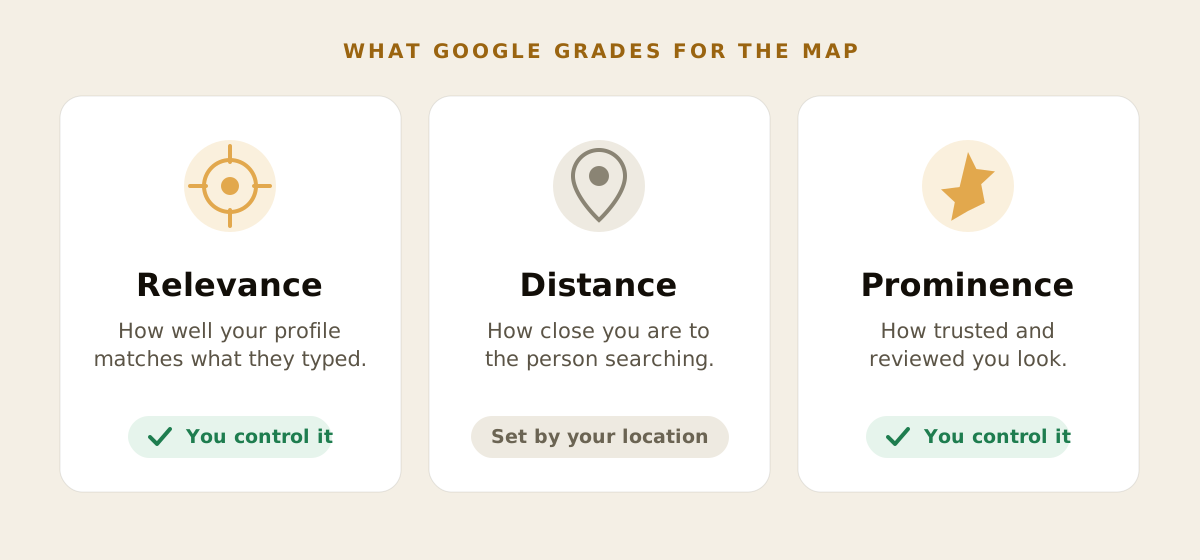
Once your profile is set up, it helps to know what Google weighs when it decides who gets the three spots. Google has said it ranks local results on three factors. Here they are in plain English, with what you can do about each.
1. Relevance: does your profile match the search?
This is whether your profile clearly fits what the person typed. You control it directly through your category, your description, your menu, and your photos. The more specific and complete your profile, the more searches Google confidently matches you to. This is why Steps 2 and 3 matter so much.
2. Distance: how close are you to the searcher?
Google favors places near the person searching. You obviously cannot move your restaurant, so this one is out of your hands. But it is also why a small neighborhood spot can beat a famous place across town for someone standing nearby. Do not chase being number one for the whole city. Own your blocks.
3. Prominence: how well-known and trusted are you?
This is your reputation, online and off. It is built from your review volume and rating, mentions of your restaurant around the web, and consistent information everywhere. It is the most competitive factor, and the one your reviews routine in Step 4 improves over time. The longer you stay consistent, the more prominent you look next to competitors who set up once and stopped.
The takeaway: of the three, you have strong control over two (relevance and prominence) and none over the third (distance). So pour your energy into a complete profile and a steady stream of reviews, and let being close work in your favor for the guests nearest you.
Step 6: Stay ahead with a 15-minute weekly routine
The most common mistake is treating all of this as a one-time setup. The restaurants that hold the 3-pack keep their profile active, and Google notices freshness. The good news is the upkeep is tiny once the foundation is built. Here is a 15-minute weekly routine you can do yourself or hand to a manager.
Your weekly 15 minutes
- Post one update. In your business box, tap "Add update" or open the "Posts" section, and share a special, an event, or a new dish with one good photo. These show on your profile and signal you are active.
- Add two or three fresh photos. A new plate, a busy Friday night, the new patio setup. Quick phone shots are fine.
- Reply to every new review since last week, good and bad.
- Ask five guests for a review using your link or QR code, ideally your happiest tables.
- Double-check hours for any holiday or event coming up, and set special hours if needed.
That is the whole job. Do it every week and you will quietly pull ahead of competitors who set up their profile once in 2022 and never touched it again. They are the ones you replace in the three.
A quick note for bilingual neighborhoods
In a lot of markets, including much of Miami, a large share of diners search and read reviews in Spanish. If that describes your guests, write your description and post updates in both English and Spanish, reply to reviews in the language they were written, and make sure your category and attributes are dialed in. Being genuinely bilingual on your profile is not a nice extra here. It is how you reach half the neighborhood that an English-only competitor is missing.
If your hands are full running the floor and this routine keeps slipping, that is exactly the kind of ongoing work a local partner handles for you. When you are ready to hand it off, tell us about your restaurant and we will map out a plan built around your spot, your menu, and your neighborhood.
Frequently asked questions
How do I outrank a competitor on Google Maps?
Focus on the things Google lets you control. Claim and fully complete your free Google Business Profile, set the most specific category for your cuisine, fill in every field including hours, photos, and your menu link, and steadily collect Google reviews and reply to all of them. Most competitors leave gaps and let their profile go stale, so a complete, active profile and a steady stream of fresh reviews is usually what moves you ahead of them over a few weeks to a few months.
What is the local 3-pack in simple terms?
It is the small map at the top of Google search results that lists three businesses, each with a star rating and a directions or call button. For a restaurant it is the most valuable spot on Google, because most hungry people pick one of those three and never scroll down. Getting into it is free and runs almost entirely on your Google Business Profile, which is the box of information about your restaurant that Google displays.
What is the difference between SEO and local SEO for a restaurant?
SEO (search engine optimization) is the broad practice of setting things up so you show up in search. Local SEO is the slice of it that gets a physical business to show up for nearby searches, like "brunch near me." For a restaurant, local SEO is what matters most, and the main thing it depends on is your Google Business Profile and the map, not your website.
How much does it cost to get into the Google 3-pack?
Nothing. This is not advertising and you do not pay Google for it. The 3-pack is built from your free Google Business Profile. The only cost is your time to claim the profile, fill it in completely, and keep it active with photos and reviews. The paid "Sponsored" results you sometimes see above the map are separate ads, not the 3-pack.
How long does it take to start outranking competitors in the map?
Plan on a few weeks to a few months. After you verify your profile (which itself can take up to about five business days), Google needs time to trust your information and see steady activity like reviews and posts. Less competitive searches and areas with few rivals nearby can move faster. The restaurants that climb fastest are the ones that fill in every field and collect reviews consistently rather than once.
Do I still need a website if I have a Google Business Profile?
Yes, but for different jobs. Your website is the page you own at your own address, like yourrestaurant.com, and it shows up in the regular blue-link results lower on the page. Your Google Business Profile is the free box Google shows about your restaurant, with your hours, photos, reviews, and map pin, and it is what powers the 3-pack. For walk-in and "near me" searches, the profile usually matters more, so set it up first.
How do I beat a competitor who already has more reviews than me?
You do not need to overtake their total overnight. Recency and consistency carry real weight, so a restaurant that adds a few fresh reviews every week and replies to all of them can outrank one with a big but stale pile of old reviews. Keep your rating high, ask happy guests right after a great meal, reply to every review, and pair it with a complete profile and the right category. Over a few months, steady momentum often beats a static head start.
How do I get more Google reviews without annoying my customers?
Make it effortless and ask at the right moment. Grab the short review link from the "Ask for reviews" button in your profile, turn it into a QR code, and print it on receipts, table tents, and takeout bags with a friendly line. Ask happy guests right after a great meal, when they are most willing. Then reply to every review that comes in. A steady, low-pressure trickle beats a one-time blast and looks more natural to Google.
I run a restaurant with mostly Spanish-speaking customers. Does that change anything?
Yes, lean into it. In many markets a large share of diners search and read reviews in Spanish, so write your profile description and posts in both English and Spanish, reply to each review in the language it was written, and make sure your category and attributes are set correctly. Being genuinely bilingual on your profile helps you reach guests an English-only competitor misses, and it is a real edge in those neighborhoods.
If this was useful and you would rather hand it off, book a free strategy call and we will build a plan around your specific restaurant.
Christian Paula
Christian Paula is the Creative Director at Button Up Media, a restaurant-focused marketing agency based in Miami, Florida. He leads the content, video, and design work that helps restaurants, bars, and coffee shops stand out and fill seats.